How to Use Google Autocomplete for Keyword Research
Follow the words Google adds to a topic. Use those clues to find a specific need, then check the idea before planning a page.
Try the free keyword toolA small change opens a new angle
coffee grinder + for
A use case to investigate
Build a shortlist you can explain
Keep the need behind the phrase visible at every step.
Set the market
Choose a seed, language, and country. Keep those settings with your notes.
Expand the topic
Collect suggestions, questions, and prepositions with All types.
Keep one angle
Filter by a useful phrase. Exclude terms and select rows for your shortlist.
Check the answer
Inspect the ranking pages and decide what evidence your page would need.
Read the modifiers before you count the keywords
“For espresso” changes the product requirements. That is the clue worth keeping from this list.
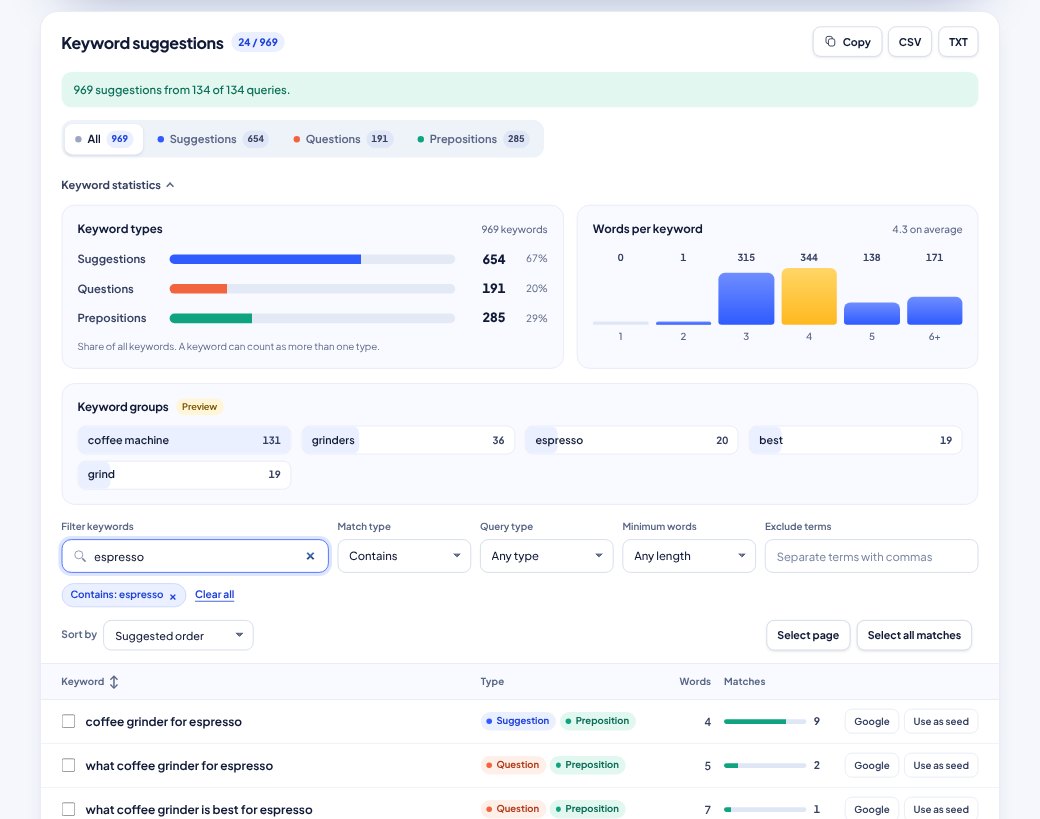
Filter for the needespresso
Look at which phrases share a buying decision. “For espresso and pour over” raises an additional requirement. Check whether your recommendations work for both brewing methods.
Keep the scope manageableSelect rows or export all matches
For a brief, a few representative phrases may be enough. To preserve a whole research angle, export the filtered list. The CSV also retains the locale and source queries.
Change one market setting at a time
A controlled comparison makes it easier to understand why the wording changed.
English · All types · searches close together
Export the result list.
Compare wording and use cases.
What to check in the two lists
Look for spelling, brands, availability, and the constraints people add. Use the same seed and mode for both runs. If you change the language too, record that change so the comparison stays interpretable. This diagram describes a method and makes no claim about which terms will appear.
Google says predictions consider language, location, trending interest, and past searches. How Google explains autocomplete
Use each source for the question it answers
Build ideas first, then collect the additional evidence your decision needs.
Predictions help you discover modifiers, questions, and related search phrasing. Prediction details
Research monthly search estimates and advertising data for a selected market. Planner instructions
Inspect the expandable questions on a Google results page and the pages that answer them.
How to take your shortlist into Keyword Planner
Copy the phrases you selected in KeywordTrail. In Keyword Planner, open Get search volume and forecasts and paste the list. For an uploaded keyword file, Google specifies a single column headed Keyword. Select the relevant location and inspect the metrics before making your decision. Follow Google’s import instructions.
Finish with a page plan
Save the decisions that a spreadsheet of phrases leaves open.
Research notes for a useful page
- Audience and task
- Who is searching, and what decision or problem brought them here?
- Scope
- Which related phrases share that task, and what belongs in a separate guide?
- Evidence
- What photos, tests, examples, or official information will make the answer useful?
- Next check
- Review the current search results and verify time-sensitive details before writing.
Questions about the method
Does autocomplete show the most popular keywords?
Not necessarily. Google considers several signals when selecting predictions. A suggestion gives you wording to investigate. For relative search interest over time, Google points to Trends. Google’s explanation.
What is the alphabet soup method?
Typing your topic followed by each letter of the alphabet and noting the predictions: “coffee grinder a”, “coffee grinder b”, and so on. It works, but it takes a long time by hand. KeywordTrail runs every letter and digit before and after the seed in one search.
Is Google Autocomplete better than Keyword Planner for keyword research?
They answer different questions. Autocomplete shows how people phrase a search, including long and specific phrases. Keyword Planner estimates how often a phrase is searched. Use autocomplete to find ideas and Keyword Planner to size a shortlist. Keyword Planner instructions.
Why do results change?
Language, location, trends, timing, and personalization can affect predictions. Save the market and date with your research. A later run can surface a different set of phrases.
Can I do this manually?
Yes. Type a seed into Google and inspect the predictions before submitting it. Add a question word or a preposition to explore another angle. KeywordTrail runs these variations together and gives you filters and an export.
How should I use question suggestions?
Check the task behind the wording. A short clarification can become an FAQ. A distinct procedure may deserve a guide. How to find and sort questions.
How do I avoid publishing several pages for the same intent?
Compare the answer you would give for each phrase. Group the phrases that need the same advice and evidence. Check the result pages for overlap before separating them. Keyword clustering step by step.