Google Autocomplete
Free KeywordTool.io Alternative
The same source, Google Autocomplete, with every result visible and a full CSV export for guests. This page shows where the two tools differ.
KeywordTrail has no paid plan. Guests get 3 searches per day, free accounts 10.
Try a free searchSee the comparison- 654Suggestions
- 191Questions
- 285Prepositions
KeywordTrail and KeywordTool.io side by side
| Feature | KeywordTrail | Keyword |
|---|---|---|
| Free keyword ideas | Every suggestion Google returns. 969 for “coffee grinder” in our US run. | Up to 750+ keywords per search, according to its homepage. |
| Account | Optional. Guests can search and export the full list as CSV or TXT. | Not needed for the free version. |
| Search volume and CPC | Not available. | Search volume, CPC, competition, and trends are Keyword Tool Pro features. |
| Platforms | Google web search. | 17 platforms, including Google, YouTube, Bing, Amazon, eBay, app stores, and social networks. |
| Markets | 52 languages and 249 countries and territories. | For Google: 190+ countries and 50+ languages. |
| Paid plans | None. | Pro Starter is listed at $88 per month, or $68 per month on the discounted rate. 30-day money-back guarantee, no free trial. |
KeywordTool.io details taken from its own pages on November 25, 2026. Homepage · Pro pricing
New search
Keyword suggestions 0
Search comparison
New keywords
Missing keywords
Save your results and explore keyword groups with a free account.
Keyword statistics
Share of all keywords. A keyword can count as more than one type.
Keyword groups Preview
Your results will appear here
Enter a seed keyword to start exploring suggestions.
Filter the list, then export all of it
Our coffee grinder search narrowed to espresso. Guests can copy or download what they see.
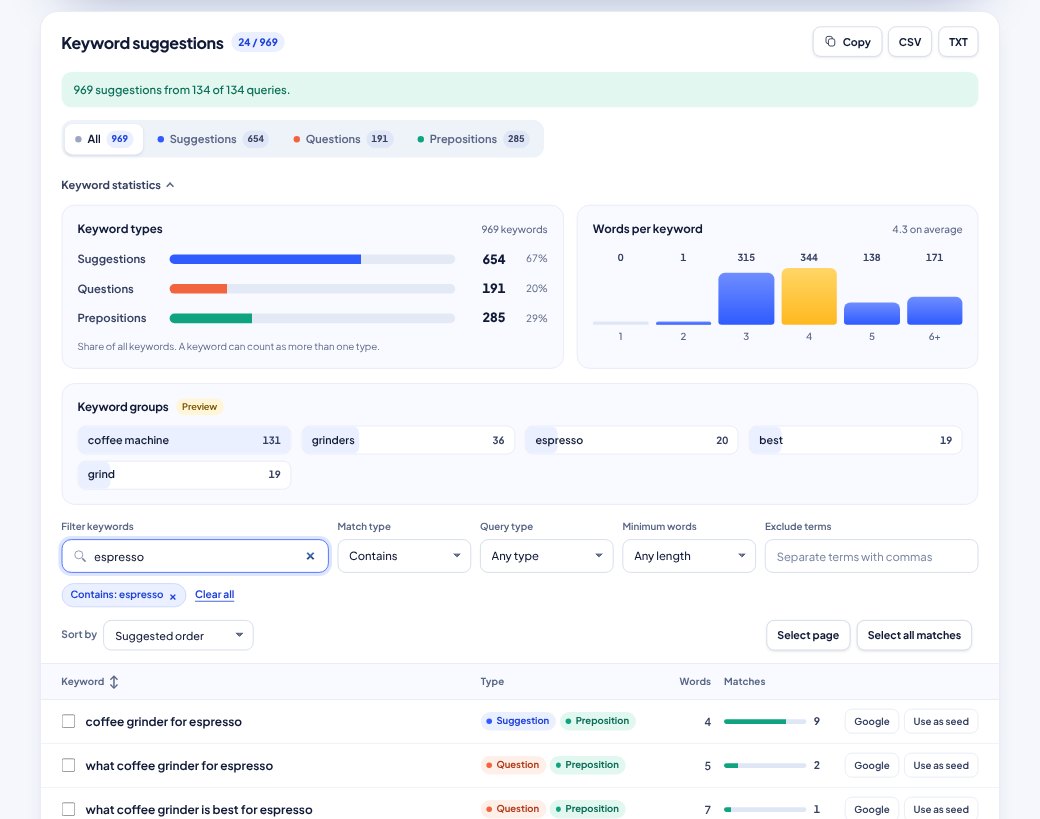
Every result is visible
Nothing is blurred or held back for a paid plan. The count next to each tab is the number of keywords you can scroll, filter, and export.
Three views of one search
All types fills the Suggestions, Questions, and Prepositions tabs. Each keyword carries a type badge, its word count, and the number of queries that returned it.
Exports keep their context
The CSV lists the source queries and collection time for each keyword. You can see later which market and which query produced a phrase.
When KeywordTool.io is the better choice
If you research keywords for YouTube, Amazon, eBay, app stores, or social platforms, KeywordTool.io queries those platforms and KeywordTrail does not. People search differently on each one, so Google predictions are a weak substitute.
If you need search volume, CPC, competition, and trend data next to every keyword, or API access and bulk checks, those are part of Keyword Tool Pro. KeywordTrail leaves demand checks to Google Keyword Planner. See the Pro plans.
When KeywordTrail is enough
Three situations where a free autocomplete tool does the job.
You want to see how people phrase a need before you decide what to write. Volume comes later, for a shortlist.
A few searches per week fit inside the daily allowance. Export each run and keep the files.
Blogs, affiliate sites, and service pages mostly need Google predictions for their own language and country.
How to add search volume for free
The step a free autocomplete tool leaves open.
Shortlist
Filter the results and select the phrases you would consider writing about.
Copy
Use Copy selected, or download the TXT file with one keyword per line.
Paste
In Google Keyword Planner, open Get search volume and forecasts and paste the list.
Compare
Set the same country you searched here, then read the monthly estimates.
Frequently asked questions
Is KeywordTool.io free?
There is a free version that needs no account. Its homepage says it generates up to 750+ keywords from Google Autocomplete per search. Search volume, CPC, competition, and trend data belong to the paid Keyword Tool Pro plans. Checked November 25, 2026. KeywordTool.io.
How much does Keyword Tool Pro cost?
On November 25, 2026 the pricing page listed four plans: Starter at $88, Growth at $188, Scale at $388, and Agency at $788 per month, each with a lower rate marked as saving over 20 percent. The page offers a 30-day money-back guarantee and no free trial. Keyword Tool Pro pricing.
What is the best free alternative to KeywordTool.io?
It depends on what you used it for. For Google Autocomplete ideas with a full free export, KeywordTrail covers the same source. For free search volume, use Google Keyword Planner. For YouTube, Amazon, or app store keywords, a multi-platform tool is still the better fit.
Can KeywordTrail show search volume like Keyword Tool Pro?
No. KeywordTrail has no volume, CPC, or competition data. Export your shortlist and check it in Google Keyword Planner, which gives monthly search estimates at no cost with a Google Ads account. Google Keyword Planner guide.
Do both tools use the same data?
Both collect Google Autocomplete predictions for Google keyword ideas, so the kind of phrase is the same. The exact lists differ because each tool sends its own set of query variations, and predictions change with country, language, and time.
Does KeywordTrail support YouTube, Amazon, or Bing?
No. It collects predictions from Google web search only. If you plan videos, marketplace listings, or app store pages, use a tool that queries those platforms directly.